Ask Bogeton AI a question
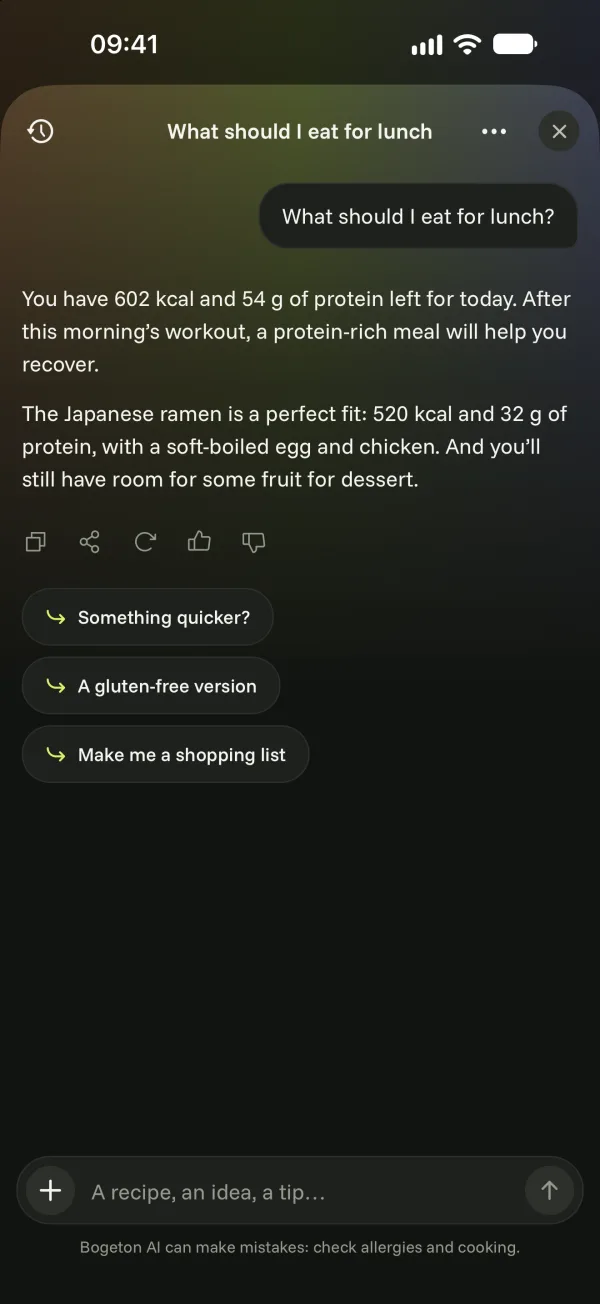
A meal to put together, a workout to adapt, a short night to make up for: Bogeton AI knows your day and answers, even from a photo.
Open Bogeton AI
- On the Today screen, tap the button with the Bogeton symbol at the top right.
- Or tap the question of the moment suggested on the home screen (“What should I eat after my workout?”, “How can I sleep better?”…).
Type your question and send. The suggestions under the answer help you go further.
What Bogeton AI knows about you
To answer accurately, Bogeton AI can use:
- your food profile (diets, allergies, excluded ingredients);
- your data: meals, workouts, nights and fitness logged in the app.
You choose: Account › Settings › Bogeton AI section › Use my food profile and Use my data.
Send a photo
Tap + to the left of the field, then take a photo or choose one from your library: a label, your fridge, a dish… The question is optional.
Your conversations
Tap the history icon at the top left to see your conversations. You can open one, rename it, pin it or delete it, and start a new conversation.