The Today screen
Your three rings, recovery, what’s left to do and today’s numbers, on one screen you can customise.
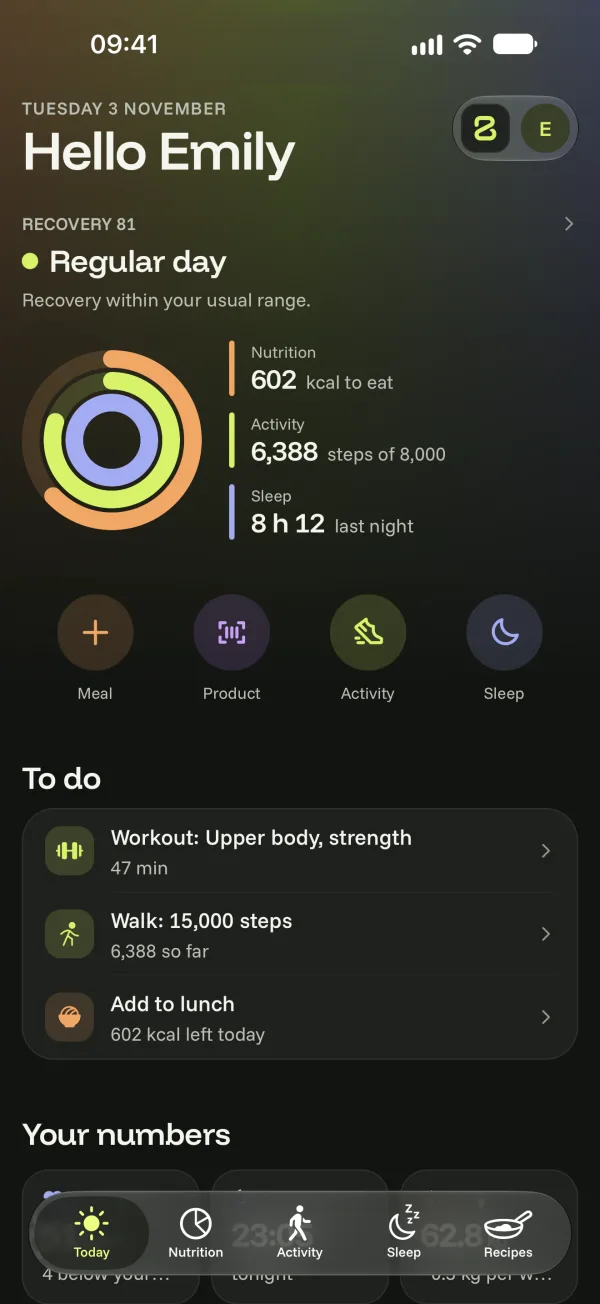
The Today tab sums up your day, on a blend of the colours of your three trackers that turns midnight blue in the evening. It fills up as the hours go by: steps arrive on their own, meals as soon as you log them, your night when you wake up.
What the screen shows
- The three rings: the kcal you have left to eat, your steps (or sessions) and last night.
- Recovery: based on your resting heart rate and your night, an intense session, a normal one or an easy day. See Recovery and resting heart rate.
- To do: three things at most, chosen for the time of day. Your session, the next meal to log, a glass of water, starting the night…
- Your numbers: resting heart rate, ideal bedtime, weight, active time.
- Last 7 days: one box per day for meals, activity and sleep. A full box means the goal was met.
- Quick actions: log a meal, scan a product, start an activity or your night, in one tap.
- Travel: the world map of your trips, with your next departure. See My trips and the world map.
- Further down: your weekly review on Mondays, the question of the moment for Bogeton AI and meal ideas for your next meal.
Customise the home screen
At the very bottom, tap Customise home and choose which blocks to show. Show everything brings back the original screen.